Illustrated translation example
Say it your way.
Write it in theirs.
Choose an output language, hold the mic, and speak. Voxly puts the words directly into your conversation. Review the result before sending.
The Android keyboard that turns your voice into words. Speak, translate, and keep the conversation going—in the apps you already use.
Free typing · Voice uses credits · Android 12+
From a quick reply to a conversation across languages.
Stay in the moment. Voxly handles the words.
For the things you want to say, and the way you want to say them.
Illustrated translation example
Choose an output language, hold the mic, and speak. Voxly puts the words directly into your conversation. Review the result before sending.
Keep it clear with plain English, or switch to Gen Z mode for a more casual style.
Illustrative tone examplesLocal word suggestions, emoji, GIF search, your last few copies, and swipe typing on supported layouts. Ready when you want to type.
Write in your own language, even in English letters, then tap → EN on the suggestion bar. Voxly swaps the paragraph you are in for its translation, and Undo puts your words back. Long-press the globe to send in Hinglish, Danish or another language instead.
Illustrated translation example
Voice typing in WhatsApp, a more casual tone, and Malayalam in action. Edited from the recent app recording.
Silent video · Edited for length
Download the film ↗A voice transcription appears in WhatsApp. Gen Z mode records and inserts a casual English result. The keyboard then switches to Malayalam and inserts Malayalam text. The final card describes free typing, voice credits, and Android 12+ support.
Recorded on an Android phone in WhatsApp. Waiting is sped up; the tap highlights and glow were added in editing.
Voice messages and translations each use one credit when they succeed. Typing is free.
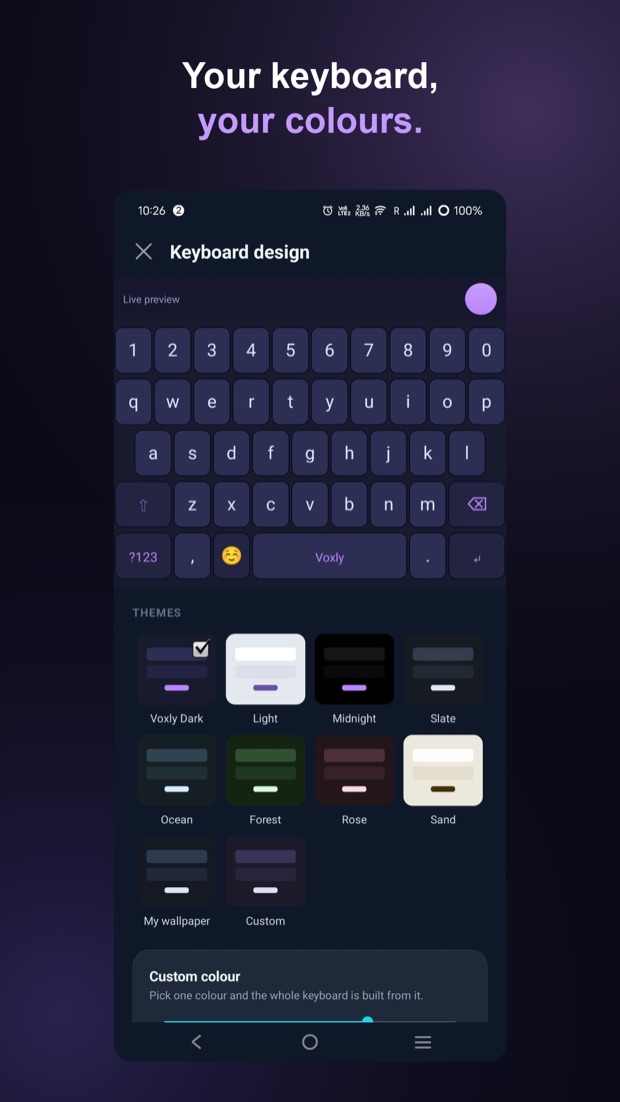
Choose a theme or start with a color. Adjust key height, shape, and borders until everything feels right under your thumbs.
Your language deserves more than a workaround. Use a dedicated script keyboard, type with English letters where supported, or let your voice do the talking.
Malayalam, Tamil, Hindi, Arabic, Urdu, and more.
Find the layout that feels familiar.
| Languages | Voice output | Keyboard layout | Type with English letters | Swipe typing |
|---|---|---|---|---|
| Malayalam, Tamil, Hindi, Marathi, Nepali, Bengali, Punjabi, Gujarati, Telugu, Kannada | Yes | Dedicated script keyboards | Script suggestions | Not on script layouts |
| Arabic, Urdu | Yes | Dedicated script keyboards | Script suggestions | Not on script layouts |
| Danish, Norwegian, Swedish | Yes | Nordic letters on their own keys | Uses Latin letters | Yes |
| German, French | Yes | QWERTZ / AZERTY | Uses Latin letters | Yes |
| Ukrainian | Yes | Ukrainian ЙЦУКЕН keyboard | Cyrillic suggestions | Yes |
| English, Dutch, Spanish, Polish, Romanian, Filipino | Yes | QWERTY; hold a key for accents | Uses Latin letters | Yes |
On small screens, swipe the table sideways. Script suggestions vary by language; swipe typing is off in romanized mode and sensitive fields. Check the app’s language picker for the current selection.
Ordinary typing stays on your phone. Typing and word suggestions are processed locally and delivered to the app you are using. Text is sent online only when you tap Translate.
Voice is processed online. Recordings travel over an encrypted connection to our server and transcription provider. Temporary audio files on our server are deleted after processing.
No transcript history on our server. Account, purchase, and usage records are separate from message content. GIF searches are sent online when you use that feature.
No subscription. Add credits when you need them.
For the messages, searches, and little things you type all day.
New users receive their introductory credits when they first use voice or typed-text translation.
Top up with a one-time pack in the app. Google Play shows the available packs and your local price before purchase.
Install Voxly, open it, and choose the language you want to write in.
Follow the prompts for microphone access. Enable Voxly in Android settings and select it as your active keyboard.
Sign in with Google for voice credits. Open a text box, hold the mic, speak, and review before sending.
Still seeing your old keyboard? Use Android’s keyboard switcher and choose Voxly.
Ordinary typing, local word suggestions and emoji work on your phone. Voice transcription, translation, GIF search, sign-in and purchases need an internet connection.
Installing Voxly, typing, swipe typing, emoji and keyboard customization are free. Voice and typed-text translation, where available, use credits. New users receive 25 introductory credits when they first use voice or typed-text translation, where available; further credits are sold as one-time packs in the app.
Supported languages offer script suggestions when you type with English letters. For example, Malayalam can suggest ഒന്ന് for “onnu”. Suggestions and conversion behavior vary by language and app version.
For English output, choose plain English or Gen Z texting style. Some translated results include an English meaning to help you review them. Always check the text before sending it.
Enabling a keyboard lets it enter text into the apps you use. Voxly processes ordinary typing on your phone; voice recordings, GIF searches, and text you explicitly submit using Translate (where available) are sent online to provide those features. Read the privacy policy before enabling it if you want the full details.
Hold a letter to see available accented characters. Danish, Norwegian and Swedish have dedicated Nordic keys. On Indian script keyboards, vowel keys show the vowel signs that go with the consonant you have typed.
Meet your new Android keyboard.
Get it on Google PlayAndroid 12+ · Free to install · Voice uses credits